Windows Service Permissions from the Command Line: DACL and SDDL Masks
A Windows service is a securable object, which means access to it is decided by a discretionary access control list rather than by group membership alone. Changing Windows service permissions from the command line is therefore a matter of editing that list, and the whole difficulty is that the list is written in access masks, not in verbs.
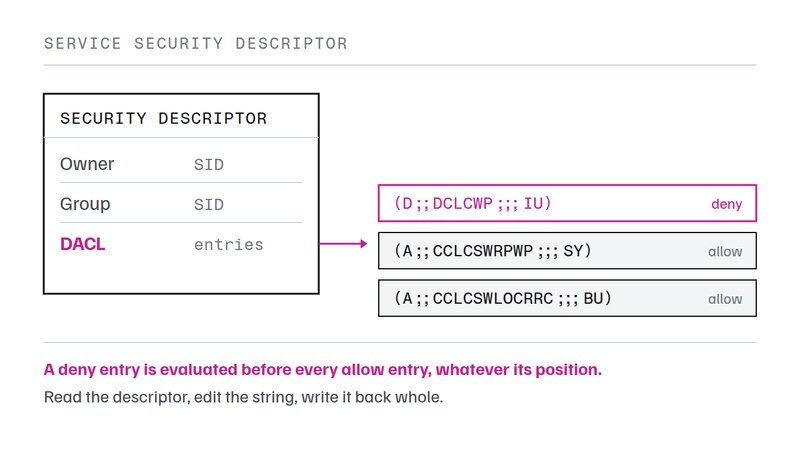
What a service DACL actually contains
Every service and every kernel driver registered with the service control manager carries a security descriptor. The descriptor holds an owner, a group, a system access control list used for auditing, and the discretionary access control list that decides who may do what. Only the last of those is what people mean when they talk about service permissions.
The default descriptor is deliberately narrow. Administrators hold full control. Power Users, on the editions that still have that group, may start and stop. Everyone holds a small read mask so that ordinary code can ask whether a service is running. Nothing in the default grants a normal user the ability to start a service, which is the single most common reason an administrator ends up editing a DACL at all.
There are three recurring situations. A service exists but should only run on demand, and the people who need it are not administrators. A user-mode program needs to load or unload a specific device driver to work. Or an application installs a helper service and then expects unprivileged code to control it. All three are solved by granting a precise mask to a specific group, and all three are made worse by granting full control because it was quicker.
Descriptor at a glance
- Stored under
HKLM\SYSTEM\CurrentControlSet\Services\<name>- Default owner
- NT AUTHORITY\SYSTEM
- Read the descriptor
sc sdshow <service>- Write the descriptor
sc sdset <service> <sddl>- Estate-wide equivalent
- Security policy, System Services node
- Applies at
- every service start, and immediately for new access checks
The access mask, letter by letter
The mask is the part that resists memorisation, because a service has twelve meaningful
rights and four conventional combinations of them. The tool that documented this most
compactly was scacl.exe, a small freeware utility for Windows NT that gave
each right a single letter and let a caller compose them into a string. Its letters are a
useful teaching notation even now, because each one maps exactly onto a Win32 constant and
an SDDL token that current tooling still uses.
Select a combination below to see which single rights it contains and what the resulting grant looks like. The composites are not shorthand invented for convenience: they are the groupings the Win32 service API itself defines, which is why the same four keep appearing in vendor documentation.
No composite selected — all twelve single rights are listed individually below.
R = CHLIQ — Everything that only reads: the configuration, the status, the dependency list, the access control list, and interrogate, which asks the service itself to report.
X = CPSEU — Operate the service without being able to reconfigure it — the mask an operator account actually needs.
W = CG — Change the configuration but not the security descriptor. Grant it deliberately: it includes the binary path.
F = HGQLSEPIUDCO — Every right above, including deleting the service and rewriting its access control list.
| Letter | Permits | Detail |
|---|---|---|
H | Query config | Read the service configuration — binary path, start type, dependencies, logon account. |
G | Change config | Change the service configuration. This is the right that lets a caller repoint the binary path, so it is effectively code execution as the service account. |
Q | Query status | Ask the service control manager for the current state — running, stopped, start-pending. |
L | Enum depends | Enumerate the services that depend on this one. |
S | Start | Start the service. |
E | Stop | Stop the service. |
P | Pause | Pause and continue the service, where the service implements it. |
I | Interrogate | Ask the service itself to report its status immediately rather than reading the cached state. |
U | User control | Send a user-defined control code (128 to 255) that the service handles itself. |
D | Delete | Delete the service registration. |
C | Read security | Read the security descriptor — the right that lets a caller see the access control list at all. |
O | Write security | Change the access control list itself. A caller holding this can grant itself everything else. |
Reading a descriptor before changing it
The first command on any service should be a read. A descriptor printed with its security identifiers resolved tells you both who currently holds what and whether the entries even resolve on this machine. The older syntax listed the owner and then each entry with its mask in brackets:
C:\> scacl \\AMARETTO tcpip /S

Security settings of service tcpip on \\AMARETTO:
Owner: NT-AUTHORITY\SYSTEM (S-1-5-18)
DACL:
00: [RIU] \World (S-1-1-0)
01: [XR]  (null)\(null) (S-1-5-32-547)
02: [F]   BUILTIN\Administrators (S-1-5-32-544)
03: [F]   BUILTIN\Server-Operators (S-1-5-32-549)
04: [XR]  NT-AUTHORITY\SYSTEM (S-1-5-18)
Two things in that output are worth pausing on. Entry 01 has no name because the Power
Users group does not exist on the machine that printed it, yet the entry is still live and
still grants a mask. And World holds RIU rather than nothing,
which is why unprivileged code can normally discover that a service exists.
The equivalent read today is sc sdshow tcpip, which returns the same
information as a single SDDL string. It is denser and harder to read aloud, but it is the
exact form sc sdset expects back, so a read-modify-write cycle never has to
translate between two notations.
Granting and denying a mask from the command line
Setting Windows service permissions from the command line is a two-argument problem: which principal, and which mask. The dangerous part is neither of those. It is the difference between editing and replacing. A tool that replaces writes exactly the entries you named and discards everything else, including the entry that grants you the right to edit it again. Both the old and the current tooling default to replacing, which is why the edit flag matters more than any single right.
C:\> scacl \\AMARETTO tcpip /E /G BUILTIN\Users:SE /D Tom:SE

Do you really want to apply the new security settings [Yes/No]: y
Successfully applied new security settings to service tcpip
That single line grants the Users group start and stop, and denies the same two rights to one account. Deny entries are always evaluated first regardless of where they sit in the list, so the deny wins for that account even though the group grant would otherwise cover it. When the descriptor is printed back, a deny entry is marked to distinguish it from a grant:
00: -[SE] BISTRO\Tom (S-1-5-21-859451957-1360023216-1846434929-1003)
01: [RIU] \World (S-1-1-0)
06: [SE]  BUILTIN\USERS (S-1-5-32-545)
Order of evaluation
Switches are not applied in the order they are typed. The sequence below is the order the older tool used, and it is the same order that any correct read-modify-write cycle has to follow, because taking ownership and restoring the default both discard what came before.
- Quiet
- suppress the confirmation prompt for every following operation
- Take ownership
- the local Administrators group becomes the owner
- Restore default
- the descriptor the system writes at install time is restored, and becomes the base for what follows
- Edit
- subsequent changes modify the current list instead of replacing it
- Verbose
- print the resulting list
- Remove, replace, grant, deny
- applied last, in that order
Writing the same grant as an SDDL string with sc sdset
Windows service permissions from the command line have outlived the tool that first made them legible. Nothing about the object model has changed, so the reasoning transfers directly. What changed is the notation: instead of composing letters, a caller composes an SDDL string and hands the whole descriptor back. A grant of start, stop and query status to the Users group, appended to the default descriptor, looks like this.
C:\> sc sdshow Spooler
D:(A;;CCLCSWRPWPDTLOCRRC;;;SY)(A;;CCDCLCSWRPWPDTLOCRSDRCWDWO;;;BA)(A;;CCLCSWLOCRRC;;;IU)...

C:\> sc sdset Spooler "D:(A;;CCLCSWRPWPDTLOCRRC;;;SY)(A;;CCDCLCSWRPWPDTLOCRSDRCWDWO;;;BA)(A;;CCLCSWRPWPLORC;;;BU)..."
The inserted entry reads as an allow entry with no inheritance flags, carrying query config, query status, enumerate dependents, start, stop, interrogate and read control, for the built-in Users group. Comparing it against the mask grid above is the fastest way to check an SDDL string that someone else wrote: every two-letter token in the mask position is one row of that table.
A practical caution about sc sdset: it takes the descriptor you give it
literally and does not merge. Read the current string, insert your entry into it, and set
the whole thing back. Writing only your own entry is the modern spelling of forgetting the
edit flag, and it has the same consequence.
Where the older syntax still earns its place
Two reasons, both practical. Anyone who needs to change Windows service permissions
inherits a body of writing that predates SDDL, and the letter notation is the key to it.
First, that notation is legible: a colleague can read
/G BUILTIN\Users:SE across a desk and know what it does, which is not true of
a forty-character SDDL string. Second, a great deal of surviving documentation, forum
answers and internal runbooks were written in it, and translating them requires the table
above rather than guesswork. Knowing that X means control-but-not-reconfigure
is what tells you whether a fifteen-year-old answer is safe to copy.
It is also the shortest description of intent. "Grant the operators group X on this service" states a policy; the SDDL equivalent states an encoding of that policy. When a change to Windows service permissions has to be reviewed by someone who did not write it, the policy form is the one that gets reviewed accurately.
The tools themselves are of their time. scacl.exe was published as freeware
for Windows NT and Windows 2000 and is not maintained; on a current system the supported
route is sc, PowerShell, or a security policy. One detail stops people
before they reach the descriptor at all: sc wants the service key name, not
the display name the console shows. sc sdshow Spooler works,
sc sdshow "Print Spooler" does not, and the error says the service does not
exist rather than that the name is the wrong one of the two.
Questions about Windows service permissions
Which right actually lets a non-administrator start a service?
SERVICE_START (0x0010, SDDL RP) on its own is enough to start a service, but a caller that can only start it cannot read its state, so most tooling appears to fail. In practice the useful grant is start, stop and query status together, which is SEQ in the letter notation. Close to the X composite, but not the same thing: X carries read security, start, stop, pause and user control, and leaves query status out.
Why does granting change-config quietly grant code execution?
SERVICE_CHANGE_CONFIG includes the binary path. A principal that can rewrite ImagePath can point the service at any executable, and the service control manager will then run that executable under the service account. Commonly LocalSystem. This is why change-config is treated as an administrative right rather than an operational one.
What does an empty DACL do to a service?
An empty discretionary access control list is not the same as no access control list. Empty means every access check fails, including the service control manager reading the configuration, so the service becomes unmanageable without first taking ownership. A missing DACL means the opposite: everything is permitted.
How do I recover a service after locking myself out?
Take ownership and restore the default descriptor. The old tool spelled this scacl.exe \\HOST service /T /I; the modern equivalent is to reset the descriptor with sc sdset using a known-good SDDL string, which requires WRITE_OWNER or administrator rights on the machine.
Are the SDDL letters for services the same as for files?
No. SDDL reuses one set of abbreviations across object types and resolves them by numeric value, so the same token means different things depending on what it is attached to. On a service RP is SERVICE_START; on a directory object the same token is read-property. Reading a service descriptor with file semantics in mind is the most common way to misread one.
Does changing a service DACL survive a reboot?
Yes. The descriptor is stored with the service registration under HKLM\SYSTEM\CurrentControlSet\Services and is applied at each start. It does not survive the service being deleted and reinstalled by a product installer, which is the usual reason a carefully built grant disappears after a patch.
Can Group Policy do this instead?
Yes, and for more than a handful of machines it should. The System Services node of a security policy writes the same descriptor to every machine in scope and reapplies it on refresh, which fixes the reinstall problem above. The command line remains the faster route for one machine and for reading what is actually configured.
Why did the old tool print accounts as (null)\(null)?
Because some of the built-in accounts named in a default service descriptor do not exist on every machine, and an unresolvable security identifier has no name to print. S-1-5-32-547 is the Power Users group, absent on a domain controller; S-1-5-32-549 is Server Operators, present only on one. The identifiers are still valid entries in the list.
What is the difference between interrogate and query status?
Query status reads the state the service control manager already holds. Interrogate asks the service itself to report, which forces a running service to answer and can therefore reveal a process that is hung rather than merely idle.
Is there any reason to grant user-defined control?
Only when the service documents a control code. Codes 128 to 255 are handled entirely inside the service, so the right means "may send this service its own commands" and nothing more. Granting it to a service that implements none has no effect at all.