Run as Different User on Windows: RunAs, Secondary Logon and the Command Line
Two accounts, one desktop. It sounds like an edge case and it is an everyday one: an administrator who signs in as a standard user, a helpdesk technician on someone else's machine, a developer testing what a restricted account can actually see. Every one of those is the same operation, run as different user on Windows, and the built-in route has three spellings with quite different consequences.
The runas command and what it will not do
runas has shipped with Windows since 2000 and is the shortest path from a
command line to a second identity. It asks the secondary logon service for a token, loads
that account's profile if it has one, and starts the process.
C:\> runas /user:BISTRO\svc_report "mmc.exe compmgmt.msc"
Enter the password for BISTRO\svc_report:
Attempting to start mmc.exe compmgmt.msc as user "BISTRO\svc_report" ...

C:\> runas /user:[email protected] /netonly "explorer.exe \\FS01\reports"
The two flags worth knowing are the ones that change what the token is for.
/netonly keeps the local identity and only presents the other credentials to
remote machines, which is what you want when the account exists in another domain and has
no local profile. /savecred stores the password so the next launch does not
prompt: convenient, and a genuine security decision rather than a convenience one.
What runas will not do is elevate. It changes who the process is, not what
the process is allowed; launching a standard account this way produces a standard-account
process. It also will not work if the target account is denied interactive logon on that
machine, and it will not run anything on another computer.
Three routes, one operation
- Shell verb
- Shift + right-click → Run as different user. One program, one prompt, no scripting.
- Command line
runas /user:DOMAIN\name "program". Scriptable, exit codes available, no shell dependency.- PowerShell
Start-Process -Credential (Get-Credential) -FilePath …. Credential object can be reused within one script.- Service behind all three
- Secondary Logon (
seclogon). Disabled service means all three fail identically. - Not this
- Any utility that requires
SeTcbPrivilegeon ordinary user accounts.
Why the privilege question decides which tool is safe
The interesting engineering constraint in this area is not how to get a token, it is how to get one without handing out a privilege that defeats the point. Several utilities written in the Windows NT era asked administrators to grant "Act as part of the operating system" to the accounts that would use them. That privilege permits assembling an arbitrary token, which means any holder can place themselves in the administrators group. A tool that needs it has turned a restricted account into an unrestricted one in order to let it run one program as somebody else.
The tools that did this well went through the documented logon path instead, so no account needed any special privilege at all. That distinction is the single most useful thing to check when evaluating any run-as utility, including current ones: if the setup instructions contain a privilege assignment, read carefully before following them.
Multiple sessions on one machine, then and now
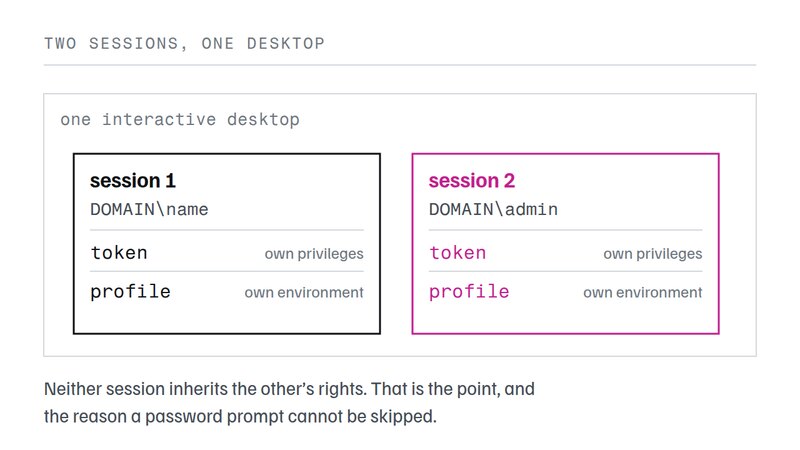
Running a single program under another account is the small version of the problem. The large version is running a whole desktop (shell, taskbar, profile) as somebody else while your own session stays where it is. Windows XP introduced Fast User Switching for this, and Windows NT and Windows 2000 had nothing comparable, which is why a small class of third-party tools existed to add it.
NetExec, published for Windows NT in 1997 and developed through 2002, was one
of the earliest. Its desktop manager created additional logon sessions, each on its own
desktop, with a tray control to switch between them; sessions could be password-protected
and closed automatically when the primary user signed out. Alongside it sat a command line
interface and a generator that produced small executables carrying an encrypted credential
and a fixed target, with an optional checksum over that target so the launcher refused to
run if the target had been replaced.
Those capabilities read as an inventory of what the platform lacked at the time: per-session drive letters, per-desktop wallpaper and taskbar geometry, home-drive mapping on session creation, logon-script execution, and a compatibility shim for applications that refused a second instance. Almost all of it is now either built in or unnecessary. What survives is the reasoning: a second session is a real logon, it costs a profile and a token, and anything that pretends otherwise is faking one of the two.
Naming note
The name NetExec is now much better known as an unrelated modern
open-source network-execution tool for security testing, the successor to CrackMapExec.
The two share nothing but a name: the subject of this page is a Windows NT
multi-session and run-as utility from the late 1990s. If you arrived looking for the
network tool, this is not it.
Doing it today from the command line, with the pitfalls
For a single program, use the built-in route. For anything repeated, put it in a script and keep the credential out of the script. The pattern below prompts once and launches several programs under the same second identity, which is the case the shell verb handles badly.
$cred = Get-Credential BISTRO\svc_report

Start-Process -Credential $cred -FilePath 'mmc.exe'    -ArgumentList 'compmgmt.msc'
Start-Process -Credential $cred -FilePath 'notepad.exe' -ArgumentList 'D:\jobs\notes.txt'

whoami /all   # run INSIDE the new process to verify identity, groups and privileges
Three failure modes account for most of the trouble. The account is denied local logon, so the token is issued and the session refuses it. The profile does not exist and cannot be created, so the program starts with a temporary profile and loses its settings on exit. Or the program itself enforces one instance per machine, in which case no amount of correct credentials will produce a second window.
The verification step matters more than it looks. A process can be running under the right
name and still be missing a group membership the caller assumed it would inherit, because
group membership is captured into the token at logon. Running whoami /all
inside the new process is the only check that shows what the token actually contains.
What to grant when run as different user has to be routine on Windows
If a team needs to run as different user on Windows regularly, the durable arrangement has three parts. The secondary logon service stays enabled, because everything depends on it. The second account gets local logon rights on the machines in scope and nothing else it does not need. And credentials are not saved. A prompt each time is a small cost against a stored secret that outlives the task.
Where a task genuinely must run without a person present, it does not belong in this mechanism at all. A scheduled task with its own service account, or a service, gives the same result with an auditable owner and no interactive credential anywhere. The rights involved are different too, and that is the part worth checking before an account is created: an interactive launch needs Allow log on locally on the target machine, a scheduled task needs Log on as a batch job, and a service needs Log on as a service. An account that only ever runs unattended work and has been given the interactive right has a way in that none of its work requires.
Questions about running a program as another account
Why is "Run as different user" missing from my context menu?
It is hidden rather than removed. Hold Shift while right-clicking, which exposes the verb on executables and shortcuts. If it is absent even then, a policy is suppressing it: the user-configuration setting HideRunAsVerb, or the equivalent registry value, and the command line route still works because it does not go through the shell verb at all.
What is the difference between "Run as administrator" and "Run as different user"?
Elevation and identity are separate axes. Run as administrator keeps your identity and raises the token to its full set of privileges. Run as different user changes the identity, and the new process starts at whatever level that other account normally gets. A standard account launched this way is still a standard account.
Is /savecred safe on a shared machine?
No. The credential is stored in the launching user profile and can then be reused by any process running as that user, without a further prompt and without limiting which program is launched. On a machine more than one person signs into, it is an offline credential store with a convenient front end. Prefer a scheduled task with a service account, or prompting each time.
Why does my tool need "Act as part of the operating system"?
Because it is creating a token the hard way. SeTcbPrivilege lets code assemble a token directly rather than asking the logon subsystem for one, and anything holding it can add itself to the local administrators group. If a utility asks for that privilege on user accounts, that privilege is the vulnerability it introduces.
Can I map the same drive letter to two shares in two sessions?
On anything from Windows XP onward, yes. The drive-letter namespace is per logon session, so two sessions can each hold their own P:. On Windows NT and Windows 2000 the namespace was global and shared, which is why tools of that era offered to simulate per-session letters. Nothing needs to simulate it now.
Does the second account need to be able to sign in interactively?
Yes, for anything that shows a window. The account needs the "Allow log on locally" right on that machine, because a secondary logon is still a logon. A denied local logon is the usual cause of a launch that fails with a rights error while the password is demonstrably correct.
Why do some applications refuse to run twice under different accounts?
They were written assuming one instance per machine and enforce it with a named object that is not scoped per session. Office applications were the classic example. There is no general fix from outside the program; the workaround is to run the second instance in a genuinely separate session, such as a remote desktop connection to the same host.
Is PsExec -u the same thing?
Not quite. It creates the process through a service it installs, which means it can also target another machine and can run in a non-interactive context, but it also means an extra moving part and an admin share. For a local, interactive launch the built-in route is simpler and leaves nothing behind.
How do I check which account a process is actually running as?
tasklist /v prints the user name column, and whoami /all inside the new process prints the identity, the group memberships and the privileges it received. The second is the more useful check, because a process can carry the right name and still be missing a group the caller expected.
Can a batch file launch several programs under different accounts?
Yes, and this is where the command line beats the shell verb: each launch is one line, credentials can come from a prompt once per account, and the exit code of a synchronous launch is available to the script. That was the main argument for the command line interfaces the older multi-session tools shipped, and it still holds.